Video Compressor for Windows: Reduce Video File Size Without Losing Quality
You don’t have to delete videos to free up disk space.
Just compress them – your files stay right where they are, and the gigabytes disappear.
What Video Files Are Filling Up Your Windows Storage?
You probably don't notice your drive filling up until it's almost full. Video files are usually the culprit. Here's what takes up the most space:
- Gameplay recordings and streamsA single hour of 1080p footage runs 4–8 GB. A few gaming sessions, and your drive is packed.
- Βίντεο smartphone4K clips can be 1–3 GB each. Move a few batches from your phone, and you're easily looking at dozens of gigabytes.
- Εγγραφές εργασίαςWebinars, Zoom calls, screen recordings with slide decks. They pile up for months and are too important to delete.
- Personal video archivesVacations, holidays, years of family moments. Sitting untouched, but taking up serious real estate.
All of these files can be made 2–3x smaller – without deleting anything and without any noticeable loss in quality.
Gameplay recordings and streams
Βίντεο smartphone
Εγγραφές εργασίας
Personal video archives

Why Compress Video on Windows?
A full drive on Windows isn't just an inconvenience. It slows down your entire system: apps take longer to open, updates fail to install, and there's no space left for temp files.
Most users don't realize that half their used storage can be recovered in minutes – just by running a video compressor.
And the compressed file is still fully usable: you can watch it, edit it, send it, or back it up to the cloud.
What video compression does for you:
- Frees up disk space – without deleting any files;
- Speeds up cloud uploads – Google Drive, OneDrive, Dropbox, and more;
- Makes sharing easier – gets around file size limits in messengers and email;
- Keeps Windows running smoothly – a full drive slows everything down.
Frees up disk space
Speeds up cloud uploads
Makes sharing easier
Keeps Windows running smoothly

How to Reduce Video Size on Windows: Your Options
Let's walk through the available methods – and why most of them are a hassle for the average user.
- Nothing to install;
- Works on any device;
- Simple interface.
- File size limit of up to 1 GB;
- Your video gets uploaded to a third-party server;
- Requires a stable internet connection;
- Free features are very limited
- Works locally on your machine;
- Flexible compression settings;
- No file size limits.
- Steep learning curve;
- Complicated interface;
- No built-in tool for finding your largest files.
- Full editing suite;
- Manual export settings.
- Compression is an afterthought, not the main feature;
- Require technical know-how;
- Heavy software, slow processing;
- Paid versions are expensive.

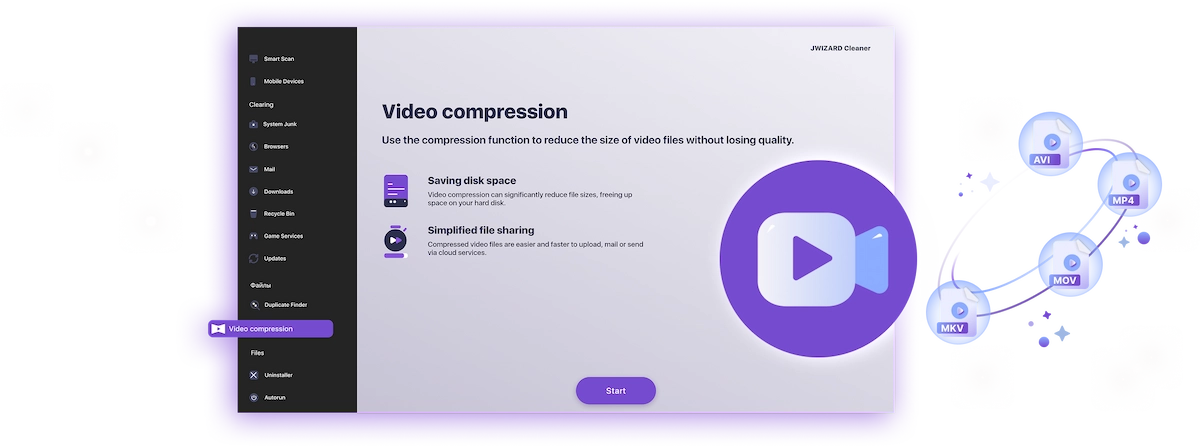
✅ JWIZARD Cleaner JWIZARD Cleaner handles video compression in just a couple of clicks: it automatically finds your largest files and processes everything locally – no technical knowledge needed, no file size limits.
How to Compress Video on Windows with JWIZARD Cleaner
Download and install JWIZARD Cleaner for Windows;
Open the "Video Compression" section from the main menu;
Select the folders to scan. The app will find all video files on your drives and display them;
Check the files you want to compress;
Choose a compression mode ("Lossless quality");
Click "Compress" and wait for it to finish. The app will then show you exactly how much space you've saved.;
Save the compressed video.
Επιλέξτε τη σωστή λειτουργία
| Λειτουργία | Ιδανικό για | Εξοικονόμηση | Περιγραφή |
|---|---|---|---|
Ποιότητα χωρίς απώλεια(όταν η ποιότητα μετράει) |
| Έως 50%Αποθηκευτικός χώρος | Αρχική ποιότητα, μικρότερο αρχείο |
Ισορροπημένο(όταν χρειάζεστε ποιότητα και χώρο) |
| Έως 65%Αποθηκευτικός χώρος | Υψηλή ποιότητα, μικρότερο μέγεθος |
Μέγιστη συμπίεση(όταν ο χώρος είναι προτεραιότητα) |
| Έως 75%Αποθηκευτικός χώρος | Συμπαγές μέγεθος, καλή ποιότητα |
Γιατί να επιλέξετε JWIZARD Cleaner;
Λειτουργεί σε Windows 10 και 11
Πλήρης συμβατότητα με τις τρέχουσες εκδόσεις.
Δεν χρειάζεται ρύθμιση
Η εφαρμογή επιλέγει αυτόματα τις βέλτιστες ρυθμίσεις.
Τα πρωτότυπά σας είναι ασφαλή
Τα αρχεία δεν διαγράφονται ποτέ αυτόματα. Εσείς αποφασίζετε.
Λειτουργεί στο παρασκήνιο
Μπορείτε να ελαχιστοποιήσετε την εφαρμογή και να συνεχίσετε να εργάζεστε.

Το εμπιστεύονται χιλιάδες χρήστες.
Πάνω από 100.000 άτομα έχουν επιλέξει το JWIZARD Cleaner για να βελτιώσουν την απόδοση των συσκευών τους. Ελάτε κι εσείς!
Σχόλια χρηστών JWIZARD Cleaner
Άλλες λειτουργίες JWIZARD Cleaner:
Καθαρισμός αχρήστων αρχείων
Καθαρισμός δεδομένων browser
Πρόγραμμα απεγκατάστασης
Καθαρισμός συσκευής Android
Κατεβάστε το JWIZARD Cleaner σήμερα
Ελευθερώστε χώρο χωρίς να διαγράψετε κανένα βίντεο!
Απαντάμε στις ερωτήσεις σας:
Which compression mode should I choose if I don't know where to start?
"Balanced" is the way to go - it works well for most tasks. Quality stays high, and you free up 60-65% of the space. If the result looks good, stick with it.
What happens to the original file after compression?
How do I compress video without ruining the quality?
Can I compress video on Windows without installing any software?
Will the app change my video resolution without my permission?
Άρθρα

Τι πρέπει να κάνω αν οι εφαρμογές δεν απεγκαθίστανται από το Launchpad;
Μάθετε πώς να επιλύετε το πρόβλημα με την απεγκατάσταση μιας εφαρμογής από το Launchpad. Αυτό το άρθρο παρέχει βήμα προς βήμα οδηγίες και χρήσιμες συμβουλές για την αντιμετώπιση αυτού του προβλήματος.

Πώς μπορώ να απεγκαταστήσω μια εφαρμογή στον Mac μου;
3 τρόποι απεγκατάστασης εφαρμογών στον Mac σας: συγκρίνετε και επιλέξτε αυτόν που σας εξυπηρετεί καλύτερα. Μάθετε πώς να απεγκαταστήσετε εντελώς μια εφαρμογή από το Mac σας και να καθαρίσετε χώρο στο δίσκο.
Απελευθέρωση χώρου στον Mac σας: Πώς μπορώ να διαγράψω άχρηστα αρχεία και να καθαρίσω το δίσκο μου;
Μάθετε πώς να καθαρίζετε το χώρο στο δίσκο του Mac σας χρησιμοποιώντας χειροκίνητες μεθόδους καθαρισμού ή ένα πρόγραμμα. Ακολουθήστε τις συμβουλές για να ελευθερώσετε χώρο και να βελτιώσετε τις επιδόσεις.